A Practitioner's Guide to AI Integrated Assignments
Make student thinking visible in the age of AI
Your students already use ChatGPT, Gemini, and Claude. The useful question is whether you can see what they learn while they use them. This guide covers four assignment types, the design principles behind them, where they fit in a real semester, and the research that makes them work.
4 assignment types9 research-backed practices15 weeks mapped out1 generator you can use today
Stop grading the artifact. Start seeing the thinking.
AI Integrated Assignments are structured Packback assignments with AI built into the learning experience. Students explain concepts to AI, defend positions against it, check its claims against real sources, and make deliberate choices about AI-generated writing.
Instead of seeing only the finished product, you see the work and the thinking behind it.
These are not new approaches to teaching. Faculty have always asked students to explain ideas, defend positions, evaluate sources, and revise their thinking. Those methods work, but they get hard to scale once a section passes thirty students. AI Integrated Assignments handle the one-on-one part and hand the results to both you and the student.
We surveyed 171 instructors about assignments in the age of AI. The most common request was a way to see how students think.
The distinction that matters: offloading versus surrender
A student who asks AI to check their grammar has offloaded a task. A student who asks AI to decide what they think has surrendered the thinking. The first is fine. The second is the problem, and a finished document rarely tells you which one happened.
Every assignment type in this guide separates the two by putting the student's own judgment on the record before, during, and after the AI enters the task.
Each type gives students a different way to use AI without handing the thinking over to it. Choose one on the left to see where it fits, what it shows you, and the research behind it.
Conversational reasoning
Close reading and analysis
Co-writing with AI
Teach the AI
Available Fall 2026
The student explains a concept to an AI that acts like a new learner. The AI asks questions and introduces shallow clarifications the student has to diagnose and correct. If the student explains something wrong, the AI repeats the mistake back.
Use it when
You want to know what the class does not understand, before you teach it or test it.
What it shows you
How well each student can explain the concept and respond to misunderstanding.
Where to place it
Due the night before the lecture it informs, or right before an exam. It replaces the weekly reading quiz and the improvised review session.
What you get back
A concept map per student and for the whole section, naming what the class got wrong before you walk into the room.
Pair it with
Send the most common misconception straight into your next Packback Discussion, then rerun the same activity in week 13 for proof of growth.
Grounded in
Just-in-Time Teaching (Novak et al., 1999), test-enhanced learning (Roediger & Karpicke, 2006), and the protégé effect (Chase et al., 2009), which holds when the pupil is an AI.
Argument Lab
Available Fall 2026
The student states a position and defends it against AI counterarguments for up to fifteen exchanges. The position locks before the debate starts, and the AI aims its counterarguments at that specific position.
Use it when
Students hold positions they cannot defend, or only four of them ever speak in class.
What it shows you
How each student reasons when their position is challenged, and who actually moves.
Where to place it
Weeks 5 to 7, in place of the outline or annotated-bibliography checkpoint. It also works as the weekly participation grade, or as a second stage after a draft is written.
What you get back
The locked starting position next to the full transcript, so you can see whether the argument held up.
Pair it with
Run the full writing arc: Argument Lab, then Deep Dives, then Peer Review, then the final draft. One grading pass instead of three.
Grounded in
The two-stage exam, where most of the learning happens in the second, defended stage (Wieman, Rieger & Heiner, 2014), and sampled oral assessment (Times Higher Education, 2025; Ipeirotis, 2026).
Claim–Source Verification
Coming 2027
The assignment makes claims about a source you choose. Students mark each claim accurate, misleading, or false, and attach evidence from the text. Claims fail in different ways, from backwards findings to wrong names to true numbers given the wrong scope.
Use it when
Students believe confident text without checking it, or cite sources they have not read.
What it shows you
Whether each student can check a claim against a source, and how they reason when the evidence is thin.
Where to place it
Weeks 9 to 12, before students start drafting, using the sources they intend to cite. It replaces fixing the bibliography at grading time.
What you get back
Each student's ruling on each claim, with the passage they highlighted as proof and their written reason.
Pair it with
Follow it with a Discussion where posts may only cite sources someone in the class has already checked.
Grounded in
Lateral reading, where fact-checkers judge a source by checking other sources instead of staring harder at one (Wineburg & McGrew, 2017; Caulfield, 2019).
Available today
The DIY toolkit includes a lateral-reading blueprint and the AI Evaluation rubric you can run in your LMS this week.
AI Co-Authored Essay
Coming 2027
Students plan first, then accept, rewrite, or reject each AI suggestion, paragraph by paragraph. That decision record is part of what they turn in, and it shows how they directed the AI and shaped the final work.
Use it when
You want to grade the choices the student made while drafting, along with the draft itself.
What it shows you
How each student directs and edits AI writing, and where they took the work back.
Where to place it
Weeks 11 to 12, in place of the unscaffolded first draft, with the final draft landing in Deep Dives where you grade it once.
What you get back
A decision record that arrives with the paper, so you never have to guess how the draft got made.
Pair it with
Combine it with Engagement Insights and the Writing Process Report for a full view of effort, planning, and authorship.
Grounded in
Self-regulated learning, where planning, monitoring, and reflection turn practice into skill (Zimmerman, 2002), and transparent assignment design (Winkelmes et al., 2016).
DIY toolkit
Want to do this yourself? Start with the toolkit.
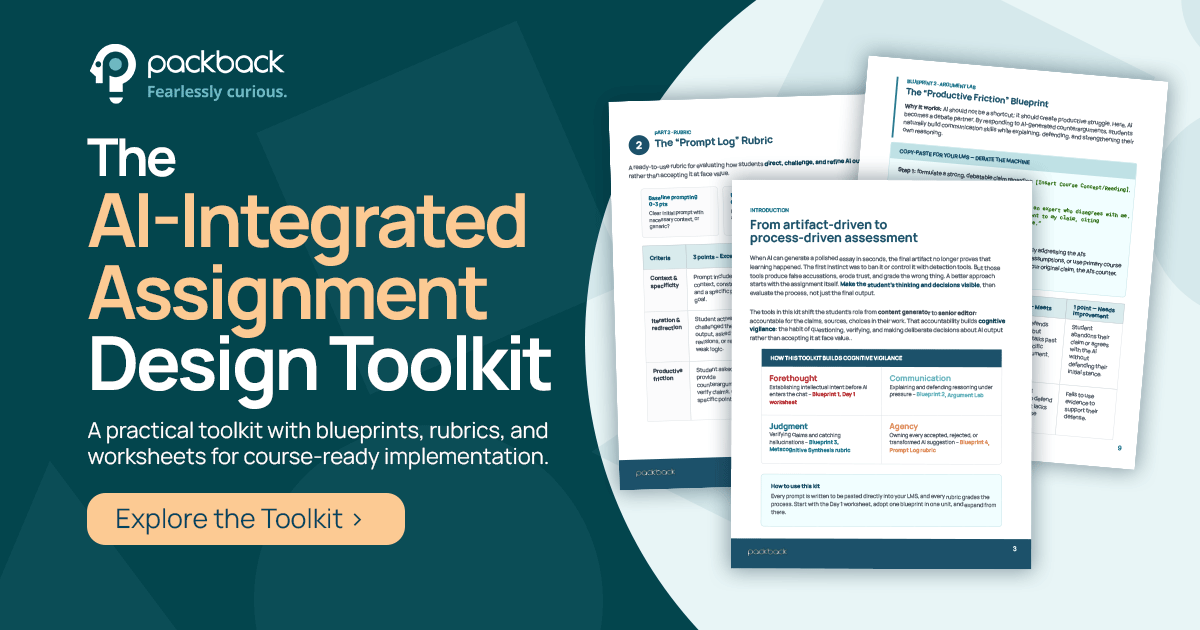
The AI-Integrated Assignment Design Toolkit is the do-it-yourself version of everything in this guide. It is built for your LMS, so you can run the approach in one unit this week without waiting for a product release.
Four classroom-ready assignment blueprints that ask students to evaluate, challenge, and make deliberate choices about AI output.
The Prompt Log rubric, for grading how effectively students direct, challenge, and refine what the AI gives them.
The AI Evaluation rubric, for grading whether students can spot a hallucination and verify a claim against a primary source.
The Day 1 goal-setting worksheet, which answers the question students keep asking: why learn this if AI can do it?
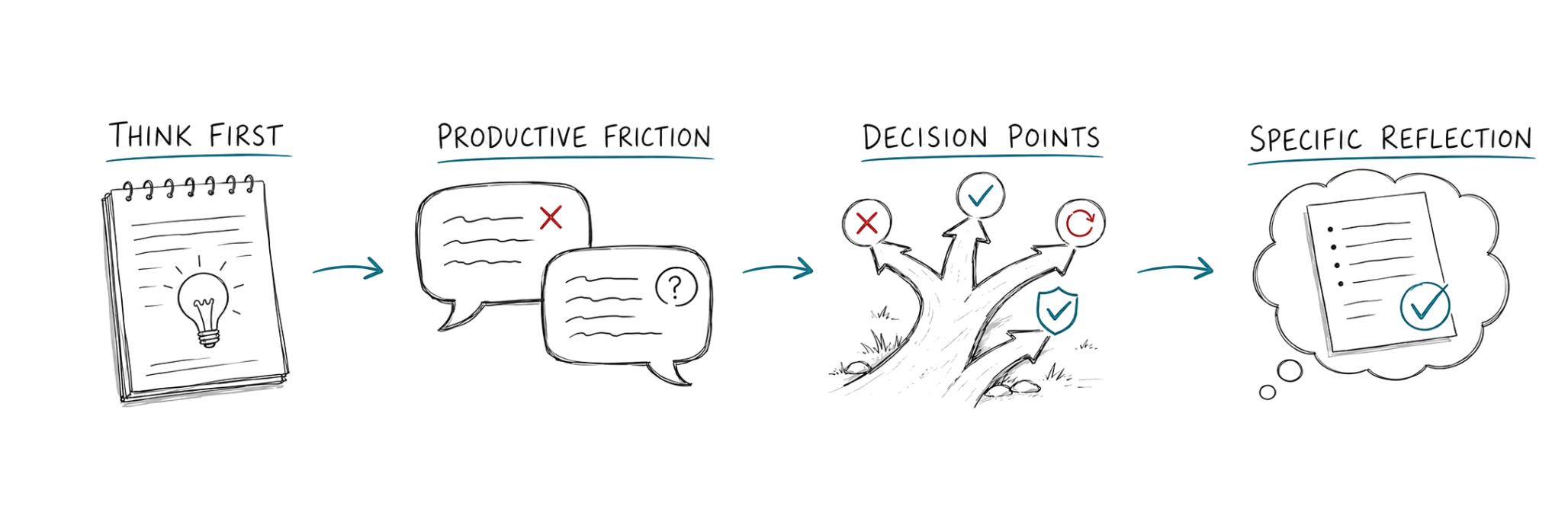
The assignment changes. The design principles do not. Each one also produces something concrete you can teach from and grade from.
1
Think first
Students commit to a position, plan, or interpretation before AI enters the task. In Teach the AI, Argument Lab, and the AI Co-Authored Essay, the student writes down their plan or position first, and it is captured as written.
You getThe starting plan, so you see what the student thought before the AI got involved.
2
Encounter productive friction
The AI does not simply supply an answer. Depending on the assignment it asks questions, argues the other side, plants errors on purpose, or offers writing the student has to make a decision about.
You getThe transcript, saved in the student's own words.
3
Make the decisions
The student stays in the driver's seat and keeps choosing how to respond: defend, verify, revise, reject, or transform what the AI gives them.
You getA decision record you can grade, instead of a guess about how the work got made.
4
Reflect on specific choices
Students account for concrete moments in their work: a claim they changed, a suggestion they rejected, an argument they reconsidered. Reflection becomes part of the learning rather than an afterthought.
You getThe reflection, tied to one specific decision instead of a vague summary.
5
Make the process visible
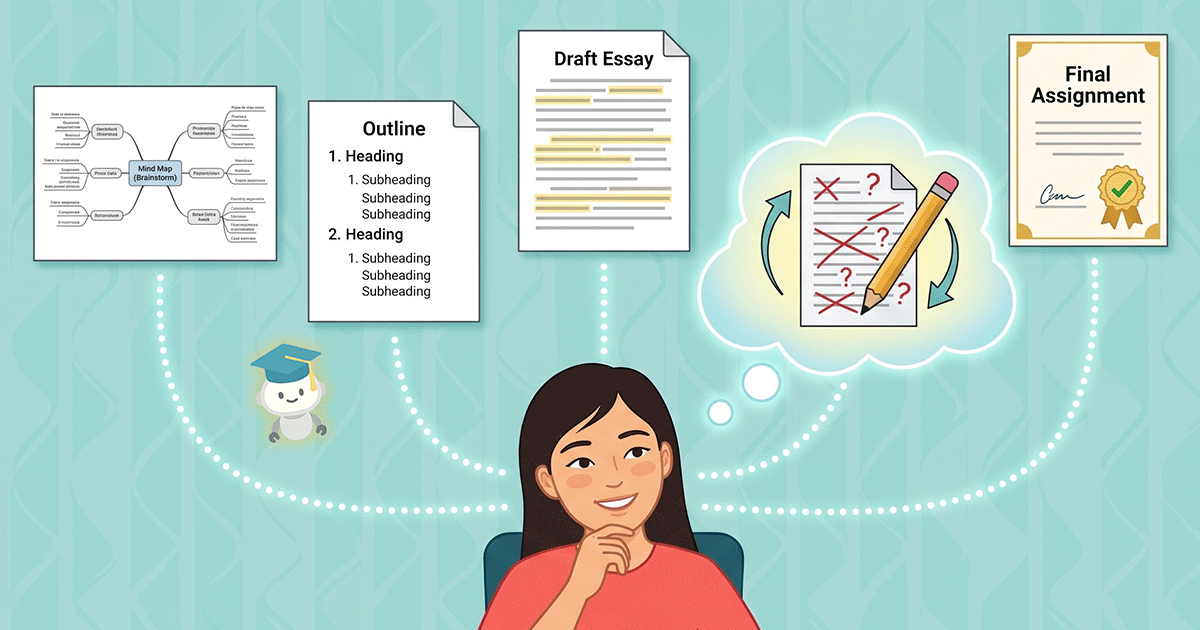
The four moments above leave a trail. The system tags each learning objective, claim, or prompt and quotes the student's own words as evidence of real judgment. You read the trail to grade it. Students read the same trail to build awareness of their own process, which is the habit self-regulated learning research keeps pointing to (Zimmerman, 2002).
Four moments, one visible record. Every AI Integrated Assignment follows this shape.You getThe summary map, per student and for the whole section.
The goal is not to make AI do the thinking. It is to design the interaction so students have to.
Every principle above exists to create one more moment where a student has to decide something and account for it. That is the whole design.
The semester
What a semester actually looks like
Consider an Intro Psychology course with 60 students. Packback Discussions already run every week, all term. AI Integrated Assignments connect into that rail at specific moments, and Deep Dives and Peer Review join once the course reaches longer-form writing.
The high-level semester snapshot
One continuous rail, four moments that connect into it, and two writing tools that join late.
Example | 15-week course breakdown
Nothing here is added on top. Each moment replaces something the instructor already runs and already grades.
Off your deskStudents see what good AI use looks like before you hand them a policy, which heads off the week-six blowup. Then you write the class rules together, pointing at what everyone just did.
Into the railFeeds the first Discussion of the term. Students arrive with something to say about how AI should work in this course.
Off your deskNo more writing quiz questions or reading 60 responses to find the pattern. You walk into class already knowing which concept the section got wrong.
Into the railTake the most common misconception and post it as the week's discussion question. The class debates a mistake most of them just made.
Off your deskWeak arguments show up at 200 words instead of 2,000, so you never read 60 outlines. The transcript attaches to the eventual draft.
Into the railStudents post the position in Discussion first, defend it here, then revise the thread post. The debate matters more because classmates will read the result.
Week 7AI Integrated AssignmentFeeds Discussions
Aim the exam review at what the class actually missed
Instead of
The review session you improvise
Run this
Teach the AI, before the exam
Off your deskNo more guessing what to review. The tags name the two concepts the class needs, and students see their own gaps while there is still time.
Into the railThe concepts with the most red become that week's discussion prompts, so review keeps running between class sessions.
Week 8AI Integrated AssignmentFeeds Discussions
Give a makeup path that proves the gap closed
Instead of
Retake and curve negotiations
Run this
Teach the AI as the makeup path
Off your deskInstead of designing makeup work one student at a time, the student re-teaches what they missed and the summary map proves the gap closed. It also fits mastery-based grading.
Into the railRuns alongside the weekly discussion without interrupting it. Only the students who need it take this path.
AI Co-Authored Essay, then the draft in Deep Dives
Off your deskThe record of choices comes in with the paper, so you never have to guess how the draft got made. The final draft lands in Deep Dives and you grade it there, once.
Into the railThis is where Deep Dives joins the semester, with Peer Review right behind it. The weekly discussion keeps running underneath.
Off your deskRerun the week-5 activities from your Activity Library and you get proof of growth with no new setup, instead of grading participation on memory and impressions.
Into the railTwo data points on the same rubric, fifteen weeks apart, with every discussion in between as context.
Start with one
You do not have to redesign a semester at once
Pick one activity and one course. Replace or strengthen one assignment, checkpoint, or classroom activity with an AI Integrated Assignment.
Start low-stakes. Give students a chance to experience structured AI use before asking them to navigate it in higher-stakes work.
Choose the learning goal first. Decide both what you want students to practice and what you want to be able to see, before you choose the assignment.
Come back to it. Repeating an activity later in the term gives students and instructors a way to compare how their thinking has developed.
A structured, flexible approach to AI policy, with practical examples from institutions that have already worked through it. Useful once the class has run one low-stakes activity and you are ready to write the rules together.
Proven teaching practices, redesigned for an AI-enabled classroom
AI changes the tools students have access to. It does not change what we already know about how people learn.
Each card pairs a documented method with the constraint that has always kept it out of large sections, and how these assignments remove that constraint.
Click to filter
Showing all nine practices.
1
Just-in-Time Teaching
Teach the AI
The method
Students answer questions before class. The teacher adjusts the lecture based on the answers (Novak et al., 1999). The problem: someone had to read 200 answers before class to find the pattern.
How to run it now
Assign Teach the AI on the reading, due at 9 p.m. the night before. Check the class map in the morning and teach the concept with the most red on it.
You get: a list of what the class got wrong, per student and for the whole section, before you walk in.
2
Peer Instruction
Teach the AI
The method
The teacher pauses lecture and asks concept questions. The wrong answers match real student mistakes (Mazur, 1997; Vickrey et al., 2015). The problem: writing good wrong answers is hard, and most courses have no published question bank.
How to run it now
Take the most common Misconception Present tags from a Teach the AI run. Write your in-class questions from them.
You get: questions built from your own students' mistakes, in their own words.
3
The oral exam
Teach the AIArgument Lab
The method
The student explains and defends their answers out loud, in real time (Times Higher Education, 2025; Ipeirotis, 2026). The problem: hours, which is why schools that brought back oral exams usually test only a sample of students.
How to run it now
Use Teach the AI or Argument Lab as the end-of-unit test. Every student answers questions in a recorded conversation, on their own time.
You get: a record you can examine for every student. One beta professor says students compare it to an oral exam. Use the tags to pick which three students need twenty live minutes with you.
4
Retrieval practice and learning by teaching
Teach the AI
The method
Testing yourself beats re-reading (Roediger & Karpicke, 2006), and explaining to someone else beats testing, a result that holds when the pupil is an AI (Chase et al., 2009; 2024 replication). The problem: nobody can tutor 60 students one at a time.
How to run it now
Replace the end-of-unit quiz with a Teach the AI on the same learning objectives.
You get: proof that each student can explain the material, which is what the exam asks them to do.
5
Exam wrappers
Teach the AI
The method
After an exam, students review how they prepared and what they missed (Lovett, 2013). The problem: reflection alone does not raise grades (Soicher & Gurung, 2017). Telling a student to go review chapter six rarely works.
How to run it now
Make the follow-up step a Teach the AI on each concept the student missed. The built-in reflection closes the loop.
You get: proof the student closed the gap, which also fits mastery-based grading.
6
The two-stage exam
Argument Lab
The method
Students take an exam alone, then defend their answers in a group, and most of the learning happens in that group stage (Wieman, Rieger & Heiner, 2014). The problem: written work never gets that second stage.
How to run it now
Run Argument Lab after the draft is written: the AI argues the other side, and the student revises and cites what the debate exposed.
You get: the locked starting position next to the final exchange. You can see whether the argument held up.
7
Lateral reading
Claim–Source Verification
The method
Fact-checkers judge a source by checking other sources. Students judge a source by staring at it harder (Wineburg & McGrew, 2017; Caulfield, 2019). The problem: the lessons use generic web examples that feel far from your course.
How to run it now
Run Claim–Source Verification on your own materials: the press release next to the study it describes, or the Wikipedia page your students cite.
You get: each student's ruling on each claim, with the proof they highlighted and their written reason.
8
Fair participation
Argument Lab
The method
Every student should get questioned and challenged, including the quiet ones. The problem is airtime: in most classrooms the same few students do all the talking.
How to run it now
Use Argument Lab as the weekly participation grade, or alternate it with live discussion. Everyone gets the same prompt, and every student gets pressed one on one.
You get: a record for every enrolled student, including the ones who never speak. See it in practice in our inclusive classroom case study.
9
Clear rules students have practiced
Any type
The method
Students do better when they know the purpose, the task, and the grading criteria up front (Winkelmes et al., 2016). The problem: AI policies are rules students have never seen in action. A syllabus paragraph in week one, a crisis in week six.
How to run it now
Run one low-stakes activity in week one, before you discuss your policy. Then write the class rules together, pointing at what everyone just did.
You get: a class that has seen approved AI use once before anyone invents their own version.
Connect these to the Packback tools you already use
Each assignment sets up the next, and you grade once at the end. These are the sequences we recommend most often, and every one of them runs on tools already in your course.
Students post a position in your discussion, defend it in Argument Lab, then go back to the thread and revise their post based on what the debate exposed. The discussion gets sharper arguments, and the debate matters more because classmates will read the result.
You getA before-and-after in the thread, plus the locked position and transcript behind it.
Run Teach the AI before lecture, take the most common misconception, and post it as the week's discussion question. The class debates a mistake most of them just made.
You getA discussion prompt aimed at what the class got wrong, pulled from their own work.
After turning in a Deep Dives essay, each student teaches its main concept in a short Teach the AI. A student who wrote the paper explains it easily. A student who outsourced it cannot. The concept map shows the difference in their own words, with no detector involved.
You getProof for each student that the understanding matches the paper.
Redesign tool
Build your own AI Integrated Assignment
Five fields produce the whole package: the activity setup, a student-facing assignment description, and a weighted process rubric that grades the thinking instead of the artifact.
Assignment and rubric generator
Fill in the fields on the left. The package on the right rewrites itself as you type, and you copy it into your LMS.
Your assignment package
What comes next
From visible learning to Learning Intelligence
AI Integrated Assignments are part of a larger direction for Packback: moving beyond whether students completed the work to understanding how they engaged, reasoned, and made decisions while doing it.
Packback already gives you visibility into engagement and parts of the learning process through Discussions and Deep Dives, and through tools including Curiosity Scores, Engagement Insights, and the Writing Process Report. AI Integrated Assignments add another layer: conversations, decisions, revisions, and reflections that show more of how students engage with ideas and with AI.
Over time, Packback is building toward Learning Intelligence, a measurement layer that connects those learning artifacts to a richer picture of how students develop critical thinking, communication, creativity, curiosity, and collaboration. We are starting with the learning experiences themselves, learning from faculty and students, and building the measurement layer from there.
You do not need an AI overhaul. Start with one place in your course where you would like to see more of your students' thinking: how well they understand a concept, how they defend an argument, how they evaluate information, or how they make decisions while writing with AI.


 Conversational
 Close reading
 Co-writing


.png?width=320&height=414&name=AI%20Integrated%20Assignments%20Toolkit%20(1).png)